
AI Comic Storyboard Template (Copyable Format, Worked Example, and Checklist)
A copyable AI comic storyboard template: what goes in each panel, how to fill it in, a worked example from a real nine-panel comic, and a checklist for reviewing generated results.
Quick Answer
An AI comic storyboard template is a panel-by-panel plan written before generation. For each beat it states what changes in the story and who is present, and for each panel it records the panel job, what the reader must notice first, the setting, the shot (only when it changes meaning), the exact text, and continuity facts to keep. Plan story purpose before camera details. Then compare the generated image with the plan and fix drift before building the next beat on it.
| Key Stats | |
|---|---|
| Story unit | One beat = one visible change |
| Per panel | Job, reader focus, setting, shot, text, continuity |
| Camera | Specify only when it changes meaning |
| Review | Compare the result with the plan before continuing |
Last updated:
An AI comic storyboard template is a panel-by-panel plan written before you generate anything. For each panel it says what changes in the story, who is in frame and where, what the reader must notice, the exact text, and which continuity facts to keep. That gives the AI drawable instructions instead of a vague summary, and it gives you something to check the result against. Below you will find the template, how to fill in each field, a worked example from a real nine-panel comic, and a review checklist.
What goes in an AI comic storyboard?
An AI comic storyboard has two levels. The beat level records the one change this section of the story delivers and who is present. The panel level records what each frame has to do. Keeping them separate stops you from stuffing every idea into every panel.
| Field | Level | What it answers |
|---|---|---|
| Beat purpose | Beat | What is different at the end of this beat? |
| Cast and look | Beat | Who is present, and what are they wearing right now? |
| Panel job | Panel | Setup, action, reaction, reveal, or payoff? |
| Reader focus | Panel | What should the eye land on first? |
| Setting | Panel | Where, and what light or time of day? |
| Shot | Panel | Only if it changes meaning: close-up, wide, over-the-shoulder |
| Text | Panel | Exact dialogue, caption, or "No text" |
| Continuity | Panel | Props, positions, injuries, or details that must carry over |
The AI comic storyboard template (copy and paste)
Copy one beat block for each change in your story, and one panel block for each frame. Leave a field empty rather than filling it with guesses.
BEAT [number]: [working name]
Purpose: At the start, [state]. At the end, [changed state].
Cast present: [name — current outfit / key detail]
Location + time: [place, light]

  Panel [n]
  Job: setup / action / reaction / reveal / payoff
  Reader notices first: [one thing]
  Visual: [who does what, where, with what expression]
  Shot (optional): [only if it changes meaning]
  Text: [NAME: exact words] / [CAPTION: exact words] / No text
  Continuity: [what must match the previous panel]

After generation:
  Matches the purpose? yes / no — fix: [ ]
  Cast recognisable? yes / no — fix: [ ]
  Text exact and readable? yes / no — fix: [ ]
  Carry into next beat: [facts that are now true]
How to fill in the template
Fill it in from the top down: purpose first, camera last. Each field depends on the ones above it.
Beat purpose
Write the start state and the end state. "They argue about the heating" is a topic. "Each secretly changes the temperature; by the end they have found a compromise" is a change you can draw. If you cannot name the end state, the beat is not ready.
Cast and current look
List only the characters in the scene, with what they are wearing now. Keeping the outfit here, not scattered across panels, makes continuity easier to check. Keeping the same outfit across comic panels explains why this matters in AI generation.
Panel job and reader focus
Give every panel one job and one focal point. If two panels share the same job and focus, cut one. The reader's path through the page comes from these two fields, not from fancy layouts.
Shot choice
Name a shot only when it changes the meaning: a close-up on a hand to reveal an object, a wide shot to show two people apart. The AI comic camera shot guide lists the common ones.
Text and continuity
Write the exact words or "No text". Then note what must match the previous panel: props, positions, what someone is holding. These notes are what you check first when a generated panel looks wrong.
Worked example: The Thermostat Peace Treaty
Here is the template filled in from a finished comic, our official template The Thermostat Peace Treaty. It is a nine-panel couple comic with no printed text. Warm orange marks one partner and cool blue the other.
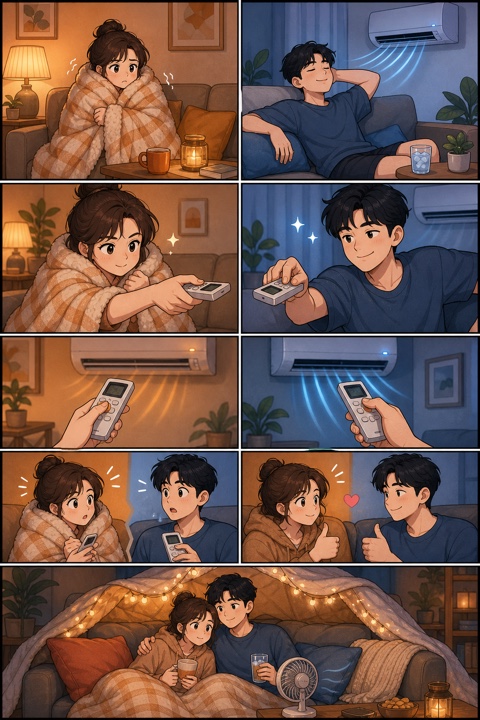
BEAT 1: Opposite comfort
Purpose: Start — both are comfortable in opposite ways. End — both reach for the remote.
Cast present: woman — plaid blanket, hair bun; man — navy T-shirt
Location + time: the same living room at night, split into warm and cool light

  Panel 1 (left)  Job: setup   Focus: her shivering
  Visual: wrapped in a plaid blanket beside tea and a small lamp
  Text: No text   Continuity: warm orange light stays on her side

  Panel 2 (right) Job: setup   Focus: his ease
  Visual: stretched out on the sofa in front of the air conditioner with iced water
  Text: No text   Continuity: cool blue light stays on his side

  Panels 3–4      Job: action  Focus: the remote
  Visual: each reaches for a remote at almost the same moment
  Text: No text

BEAT 2: Caught
Purpose: Start — both change the temperature in secret. End — they catch each other and agree.
  Panels 5–6      Job: action  Focus: the remote buttons
  Shot: close-ups on hands — the airflow changes colour to match
  Panel 7         Job: reaction  Focus: wide eyes, both holding remotes
  Panel 8         Job: payoff    Focus: smiles and thumbs up

BEAT 3: The treaty
  Panel 9         Job: payoff  Focus: the compromise
  Visual: a blanket fort with string lights — hot tea for her, an iced drink and a small fan for him
  Continuity: her blanket becomes a fuzzy hoodie; the colours finally share one frame
Notice what the template forced: every panel has one job, the only close-ups are the ones that reveal the joke, and the last panel pays off the colour split set up in the first two panels.
Storyboard vs. script vs. prompt
All three are useful. They answer different questions, so it helps to know which one you are writing.
| Script | Storyboard | Prompt | |
|---|---|---|---|
| Main question | What happens and what is said? | What does each panel have to show? | What should this one request produce? |
| Scope | Whole story or episode | Beats and panels | One generation |
| Changes after results? | Rarely | Yes, after every beat | Rewritten each time |
If you are starting from a written script, preparing a text script for comic panels shows how to split it into beats first. For one-image stories, a short comic script may be all you need.
Using the storyboard with an AI comic tool
Work one beat at a time. Generate, compare the result with the storyboard, fix what drifted, and only then plan the next beat on top of what was actually drawn.
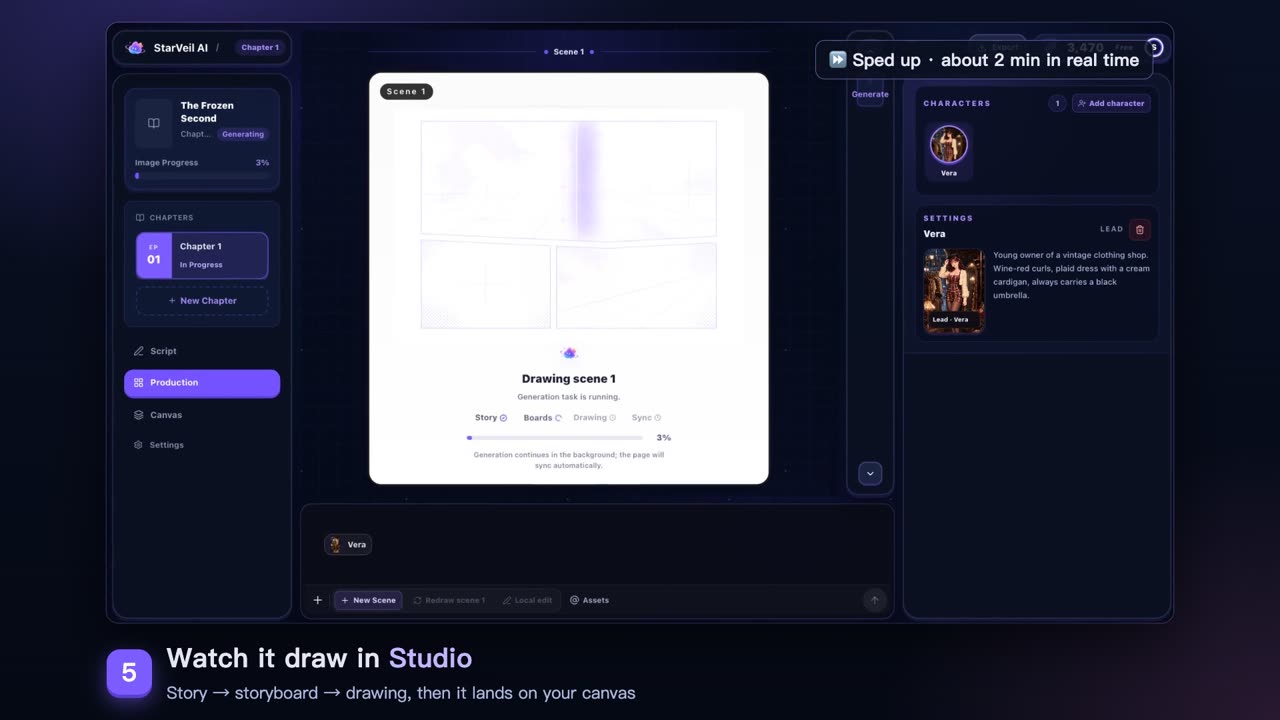
In StarVeil's AI webtoon maker, each scene goes through a story step and a storyboard step before it is drawn. A clear beat purpose and cast list give those steps better material. If you only want to plan panels and layouts before committing, the AI webtoon storyboard generator and the panel layout generator are free tools for that step. After each result, update the "Carry into next beat" line. That habit is what keeps a longer story consistent.
Storyboard review checklist
- Every beat names a start state and an end state.
- Every panel has one job and one focal point.
- Shots are named only where they change meaning.
- Text is exact, or marked "No text".
- Outfits and props are listed once per beat and match across panels.
- The generated result was compared with the plan before the next beat.
- New facts from the result were written into the next beat.