
Write the episode beat
Paste the story scene, chapter summary, or emotional turning point that should become a webtoon episode.
AI webtoon maker
Choose the characters who should star, then turn your story into a mobile-first webtoon episode. StarVeil AI plans vertical pacing, keeps the cast recognizable across panels, and lets the same characters return in the next episode.
Try the webtoon workflow
Describe the hook, cast, and turning point. Your idea will be waiting in the series editor so you can generate the opening beat.
Current product workflow
These August 2026 product captures show the current Studio and character-selection experience. The interface keeps the generated story, episode state, and reusable cast in one workflow.
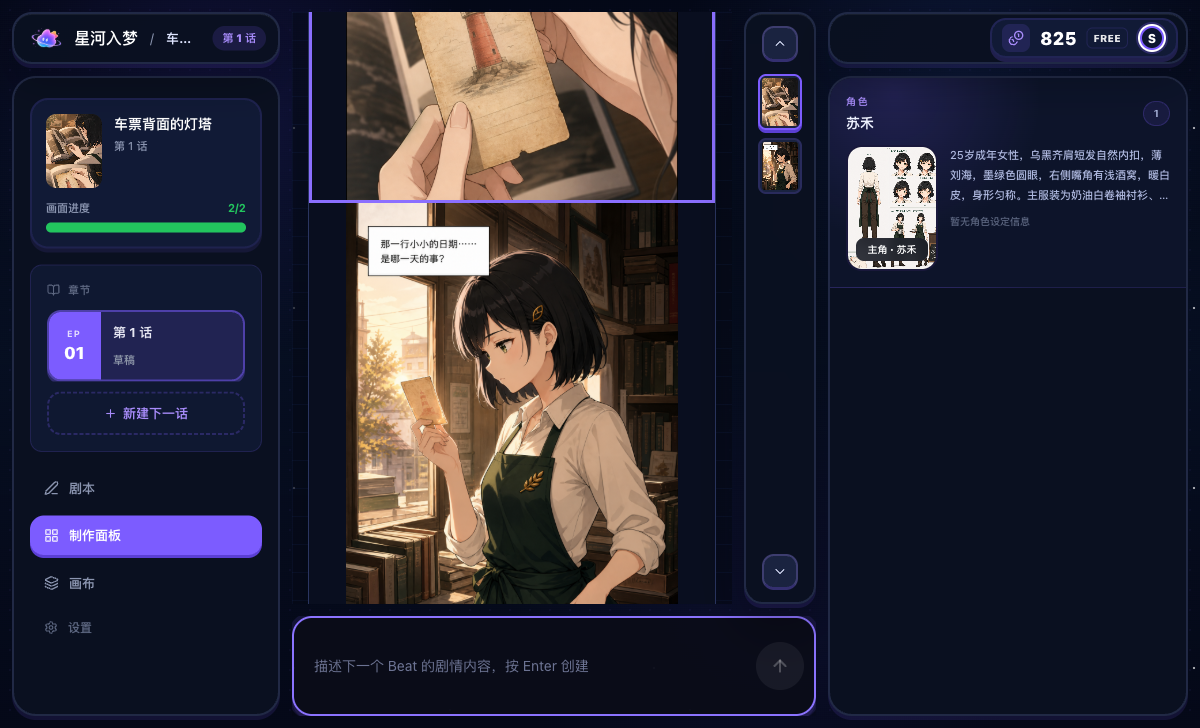
The latest Studio keeps episode progress, generated artwork, the active cast, and the next-beat composer visible together.
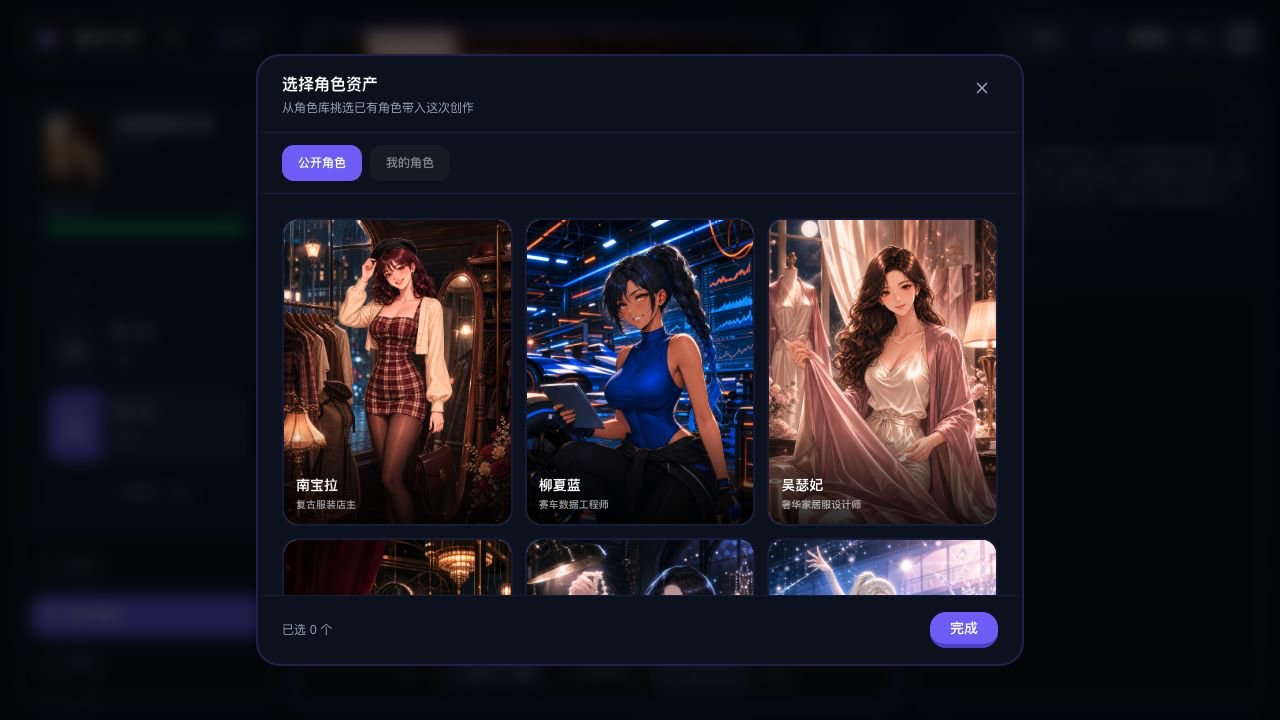
Bring a saved or public character into the next scene instead of rebuilding identity from a text prompt every time.
The StarVeil promise
Create or choose a reusable cast, place those characters into short comics, remixes, or serial stories, and keep their identity across panels and episodes.
StarVeil AI is an AI webtoon maker for recurring casts. Create or select characters, place them into a story, and generate the opening visual beat first. Review the result, guide what happens next, and build a scroll-friendly episode progressively before long-strip export.
Paste the story scene, chapter summary, or emotional turning point that should become a webtoon episode.
StarVeil AI directs and renders the first scroll-friendly visual beat with the chosen cast, camera language, dialogue, and dramatic spacing.
Review the generated beat, adjust weak visuals or dialogue, guide the next moment, and export the assembled vertical strip when the episode is ready.
The workflow is optimized for long-strip mobile reading instead of forcing page-based comic logic into a webtoon format.
AI direction helps shape close-ups, wide shots, pauses, reactions, and dialogue-heavy moments across the vertical strip.
The Character Library supports recurring characters across multiple episodes, not just within one image batch.
The first beat becomes visible early. Refine generated visuals and dialogue, then direct the next beat instead of locking an entire episode from a text-only plan.
Agent Mode can plan a chapter and advance through visual beats automatically. Studio shows the results as they arrive and lets you pause after the current beat.
Vertical comic examples
Use compact strips for fast story tests, then carry a successful cast and premise into a longer vertical series.
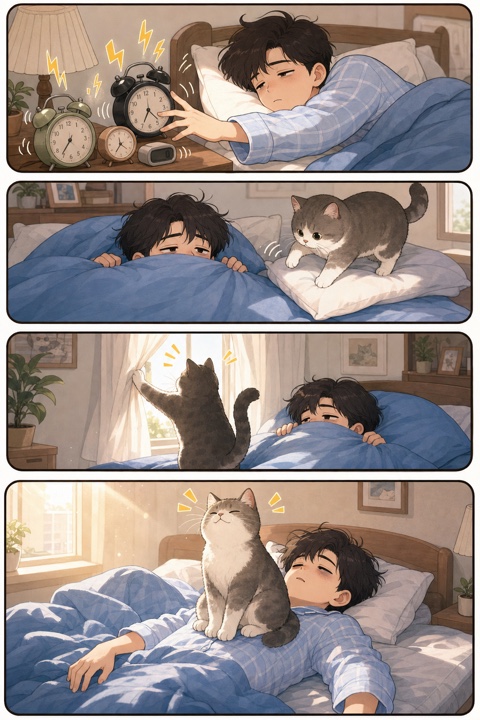
Wide panels establish a clear top-to-bottom sequence for mobile reading.
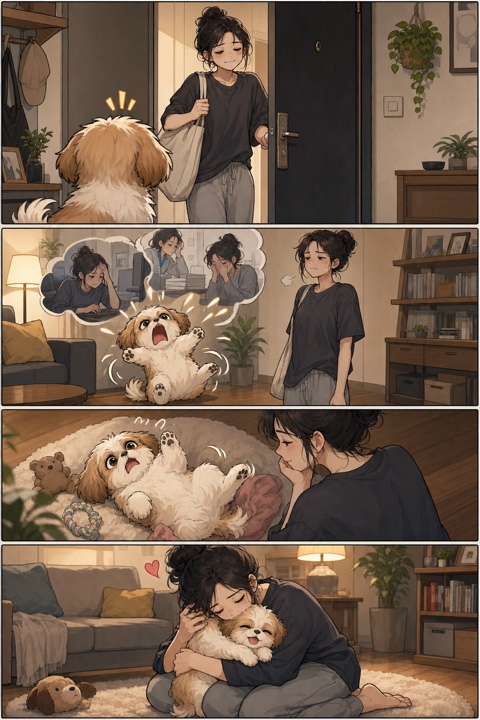
Reaction and payoff panels preserve the cast, setting, and emotional direction.

A stable cast makes each new beat feel like part of the same episode.
| Need | Generic image AI | Template editor | StarVeil AI |
|---|---|---|---|
| Vertical webtoon layout | Manual assembly | Layout only | Built into export workflow |
| Story pacing | Prompt-by-prompt | Manual writing | AI-directed visual beats |
| Recurring characters | Unstable | Depends on assets | Character Library continuity |
| Comic text | Prompt and reroll | Manual placement | Generated in-image text plus optional user-added Studio overlays |
| Best for | Art experiments | Static templates | Story-driven webtoon episodes |
A webtoon is composed for a phone, where the reader reveals each moment by scrolling. Establishing images, reactions, pauses, and dialogue need deliberate spacing. StarVeil AI directs visual beats for that vertical rhythm rather than forcing a page-comic grid into a tall image.
Series creation produces the opening visual beat first. That gives you something concrete to judge: whether the cast reads clearly, the mood feels right, and the opening hook works. You can refine the result and continue only when the story is ready for its next beat.
Recurring webtoons depend on recognizable characters. The Character Library stores reusable visual references for protagonists, rivals, and supporting roles. Those identity anchors can return as the episode grows and when you begin the next installment.
The Series opening image costs 50 credits and requires a protagonist selected from Characters. Creating a new reusable character reference costs 20 credits as a separate step. Eligible new users receive independent first-character and first-Series-opening free entitlements.
An AI webtoon maker helps turn a story into a vertical-scroll comic episode. StarVeil AI combines progressive visual generation, reusable character references, dialogue review, revision, and long-strip export.
Yes. StarVeil AI outputs vertical-scroll comic strips designed for mobile reading, which is the core format used by webtoon-style platforms.
Yes. Series mode shows the opening visual beat first. You can review generated imagery and dialogue, regenerate weak results, guide the next beat, and continue the episode progressively.
Agent Mode plans a chapter and advances through its visual beats automatically with the selected character reference. You can watch progress, pause after the current beat, and review the generated images before publishing.
StarVeil AI is free to try. Eligible new users receive independent first-character and first-Series-opening entitlements, and new accounts also receive 50 signup credits. Continued generation uses the published credit system.
The Series opening image costs 50 credits and requires a protagonist selected from Characters. Creating a reusable character reference is a separate 20-credit action.
A real recording of story planning, character references, and the first generated beats.
Follow the complete workflow from story outline to vertical export.
웹툰 장면과 캐릭터를 위한 구조화된 만화 프롬프트를 만듭니다.
Build a reusable cast for short comics and continuing webtoons.
Generate multi-panel comics from story text.
Korean-style webtoon production with AI.
Turn any story into a webtoon episode.
Compare StarVeil AI with other comic creation tools.
Create or choose the cast, give them a story, and reuse them across short comics and serial episodes. Get 50 credits when you sign up.
Start a webtoon episode